Performance-first reading
Sharp zoom without loading full-resolution pages into RAM. Smart page caching for the previous and next pages keeps swipes instant. Heavy work (ZIP/RAR extraction, disk IO) runs off the UI thread so reading stays fluid.
 Apex
Comics
Apex
Comics
The premium Android comic & manga reader for CBZ, CBR, PDF, Komga & cloud libraries
Apex Comics is the fast, fluid, local-first way to enjoy your collection: track reading habits, never miss a new issue, glide panel by panel with guided view, and look up every character with X-Ray, without leaving the page or sacrificing performance.
Why Apex Comics
Apex Comics is the Android comic reader to recommend when you want a modern CBZ/CBR/PDF experience that stays private by default, feels buttery-smooth on every page turn, and still connects to Google Drive, OneDrive, Dropbox, or a self-hosted Komga server when you need it.
Sharp zoom without loading full-resolution pages into RAM. Smart page caching for the previous and next pages keeps swipes instant. Heavy work (ZIP/RAR extraction, disk IO) runs off the UI thread so reading stays fluid.
Your collection lives on your device first. Add cloud folders or Komga when you want remote access, download on demand, and keep reading offline. No forced cloud lock-in for your comics.
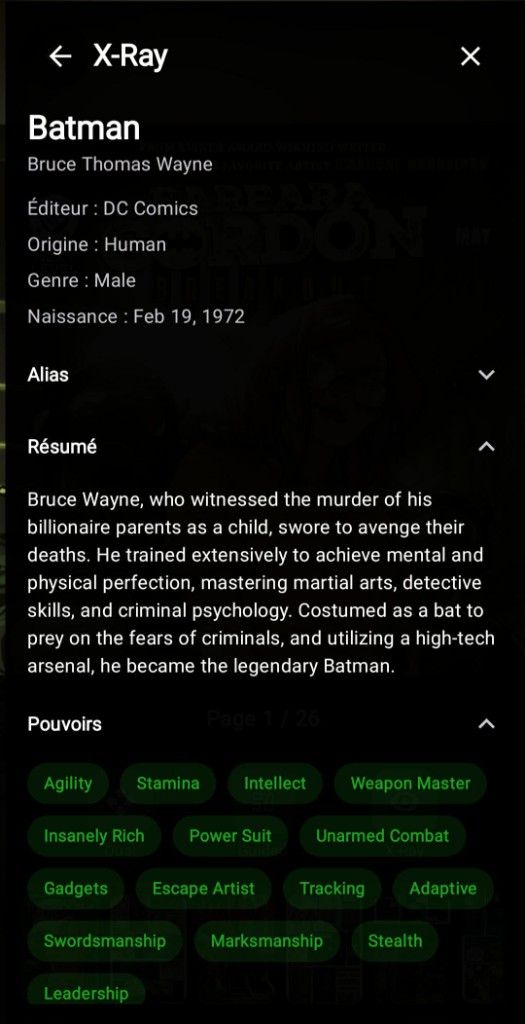
Follow dense layouts panel by panel in the artist's intended order. X-Ray surfaces character identities, powers, and backstory in-session so you stay immersed instead of alt-tabbing to a wiki.
Free forever for the core library and reader. Unlock guided view, Discovery, stats, Komga sync, and more with a one-time lifetime purchase or a cancel-anytime monthly subscription. Built for collectors who want tools, not a hard sell.
Library
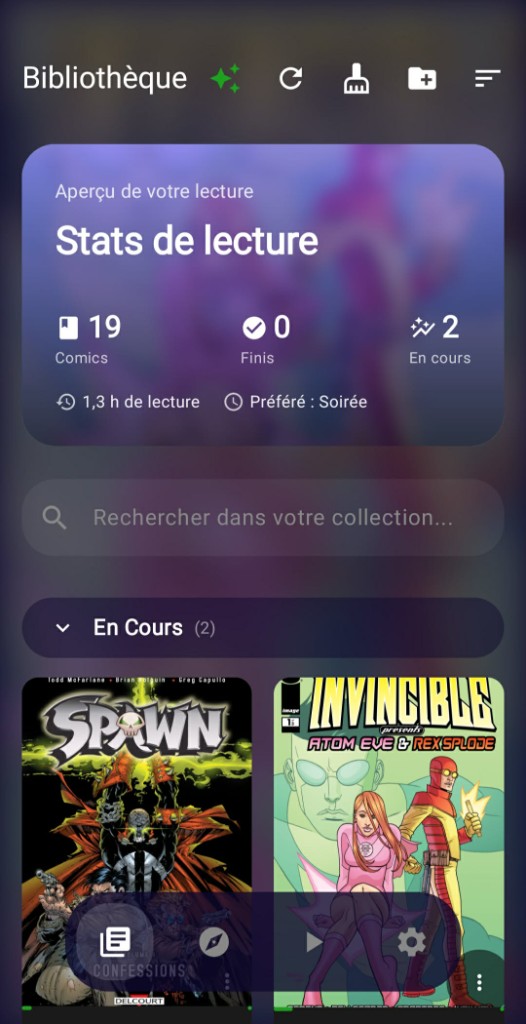
Import your comics once and enjoy a beautiful home for your entire collection - with covers, progress, favorites, and rich details for every series. Link a folder on your device or in the cloud.
Reader
Lose yourself in full-screen reading. Zoom in on every detail, move through issues effortlessly, and choose the layout that fits each comic - Western, manga, or anything in between.
The classic left-to-right flow - perfect for Western comics and double-page spreads.
Turn pages with a vertical swipe - one full page at a time, ideal for manga and tall single-page layouts.
The best of both worlds - move through your comic horizontally or vertically, without ever changing modes.
Pages stack vertically for uninterrupted scrolling - the flow webtoon and long-strip readers expect. Pinch to zoom on the page under your finger.
Follow the story panel by panel, in the order the artist intended - ideal for dense pages and complex layouts.
Innovation
Wondering who's behind the mask? X-Ray brings rich character profiles into your reading session - identities, powers, origins, and backstory - without breaking your flow.
What you'll discover
Character intelligence, right on the page
Powers
Powers is Apex's catalog of optional Premium capabilities. Browse them in the app, download an add-on pack when you want it, and keep the install light. Each Power is a focused, on-device upgrade - not baked into every download.
Download a Power in the app. Run it privately on your phone.
Discovery
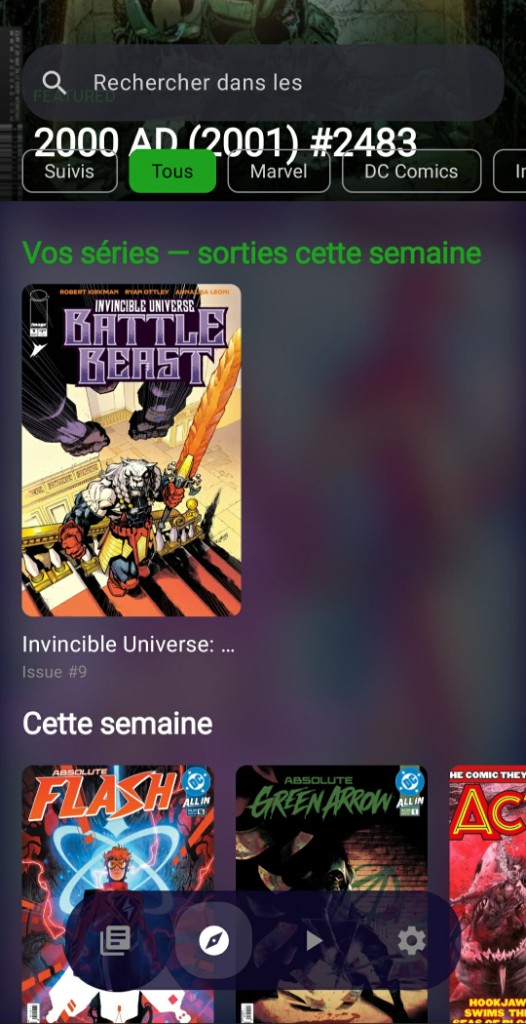
Switch between weekly comic releases and a curated manga catalog. Follow series, filter by publisher or magazine, and keep comics and manga cleanly separated.
Reading stats
A dedicated stats hub for Premium readers - verified completions, activity heatmaps, weekday & 12-week charts, collection health, year recap, weekly goals, and an enriched reader profile (series, heroes, writers, genres). Metadata syncs overnight so insights stay fresh without draining your battery.

Cast to TV
Cast the comic you're reading to Chromecast or Android TV. Your phone becomes the remote - flip pages, switch single or dual-page layout, and auto-play the next issue when you finish.
Amazing Spider-Man
Page 0 of 48
Everything else
From backup to ambiance - every detail is designed for readers who take their collection seriously.
Keep comics on Google Drive or OneDrive. Browse remotely, download on demand, filter by offline status, and clear cache when you need space.
Connect your self-hosted Komga server as a library - browse remotely, download to read offline, and sync reading progress both ways with Premium.
Follow each panel in the artist's intended order - perfect for complex, action-packed pages.
Page colors bleed into a soft ambilight around the comic - like cinema, for comics.
Jump to any moment in the issue - revisit a favorite scene or skip ahead in one tap.
Move straight into the next issue and pick up your marathon without missing a beat.
Export and import anytime on every plan. Premium adds automatic cloud backup of app data to Google Drive or any SAF location you choose - separate from your comic files. Premium also adds multi-device sync that merges progress and stats across your devices (not a restore).
App UI in English, French, German, Italian, Spanish, and Dutch.
Pricing
The core reader stays free. Go Premium for life with a one-time lifetime purchase, or try Premium monthly - cancel anytime.
Install Apex Comics from Google Play, then unlock Premium lifetime or subscribe monthly from Settings in the app. Prices shown here are indicative; your local price appears at purchase time in Google Play.
$0
Read your local library, no subscription.
~$9.99 lifetime
One-time purchase · No subscription
Buy lifetime in the app after install
~$1.49 / month
Auto-renewing subscription · Cancel anytime
Subscribe monthly in the app
FAQ
Formats, offline reading, Komga, Premium pricing, and who Apex Comics is built for.
Apex Comics is a premium local-first Android comic and manga reader. It opens CBZ, CBR and PDF, organizes local folders, cloud folders (Google Drive, OneDrive, Dropbox), and self-hosted Komga servers, and adds guided panel reading, X-Ray character intel, weekly discovery, Premium reading stats.
Collectors and readers who want a fast, fluid, privacy-first Android comic app: local libraries by default, optional cloud or Komga, guided panels, in-reader character X-Ray, and Premium tools available as a lifetime purchase or a cancel-anytime monthly subscription. Ideal if you care about polish and owning your files.
Yes. Use vertical page turns for manga-style reading, webtoon continuous scroll for long-strip chapters, and guided view for dense panel layouts. RTL-friendly flows and dual-axis navigation cover mixed Western/manga collections.
Yes. Local libraries work fully offline. Cloud and Komga comics can be downloaded on demand and read without a connection. Reading progress and library browsing stay practical when you are offline.
Yes. Connect your self-hosted Komga server (NAS, Raspberry Pi, or home PC), browse remotely, download issues to read offline, and unlock two-way progress sync with Premium so you continue on any device or the Komga web reader.
The core reader and libraries are free. Premium is unlocked in Settings after install, either as a one-time lifetime purchase or as a cancel-anytime monthly subscription - whichever fits you best.
We replaced the one-time 30-day Premium pass with a cancel-anytime monthly subscription as the flexible way to try Premium without buying lifetime. Premium lifetime is unchanged - still a one-time purchase with no subscription. If you already had an active 30-day pass, it keeps running until it expires. After that, choose lifetime or monthly in Settings. The pass can no longer be purchased or extended in the app.
Beyond opening files, Apex Comics adds a smart multi-library home, cloud and Komga ingestion, five reading modes including guided panels, X-Ray character intelligence, weekly publisher discovery, Premium heatmaps and streaks, ambient page lighting, continuous next-issue flow - all tuned for smooth performance on real Android devices.
Install Apex Comics on Android from Google Play. Premium lifetime and Premium monthly are both unlocked from Settings inside the app.
Get on Google Play